AI Image Expander for Instagram & Panorama Photos
Sometimes a photo feels too tight, a panorama needs more width, or an important part of the composition gets cropped when you prepare an Instagram carousel. PanoCut's AI Image Expander helps you add space around your image by extending its sides or its top and bottom with AI-generated content.
Expand your photo before cropping or splitting it into carousel slides. This gives you more flexibility to adjust the composition and prepare your image for the layout you want.
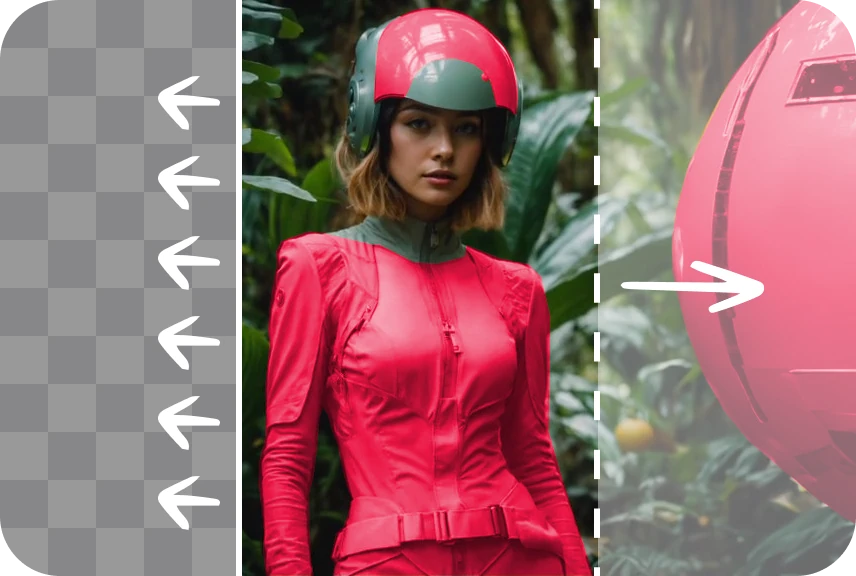
What Is an AI Image Expander?
An AI image expander extends an image beyond its original boundaries by generating additional visual content in the newly created areas. This technique can help continue a background, add room around a subject, or change an image's composition without simply stretching the original photo.
PanoCut's Expand tool is designed to help you create more space around your photos before sharing them or preparing them for Instagram. The generated result depends on the original image and the content surrounding the expanded area.
What Can PanoCut AI Image Expander Do?
- Extend image boundaries: Add space to the sides or the top and bottom of a photo.
- Generate additional background content: Use AI to fill newly expanded areas with content intended to fit the surrounding image.
- Improve image composition: Create more room around your subject when the original framing feels too tight.
- Prepare panoramic photos: Make a panorama wider before splitting it into carousel slides when additional space is needed.
- Adjust images before cropping: Give yourself more flexibility when preparing photos for different layouts.
When Should You Expand a Photo?
AI image expansion can be helpful when the original framing does not leave enough room for the composition you want.
- Panoramas that need more width: Extend the image when you want more room before creating panoramic carousel slides.
- Tightly cropped photos: Add space around a subject when the original image feels too close or cramped.
- Incomplete compositions: Generate additional content beyond the existing image boundaries to create a more spacious composition.
- Instagram carousel preparation: Expand an image before splitting it into slides when the composition needs more room.
- Creative image editing: Explore a wider or taller composition without merely stretching the original image.
How to Expand an Image with PanoCut
- Open your photo. Choose the image you want to edit in PanoCut.
- Open the Expand tool. Select the AI image expansion feature in the editor.
- Choose how to expand your image. Extend the sides or the top and bottom, depending on the composition you want to create.
- Generate the expanded areas. Apply the AI expansion and review the generated content.
- Check the result. Look at the edges, background, and transitions between the original photo and the newly generated areas.
- Continue editing or prepare your carousel. When you are satisfied with the composition, continue with your image editing or panorama-splitting workflow.
Tips for Better AI Image Expansion Results
- Start with a clear image: A well-defined original photo can give the AI more visual context for generating surrounding content.
- Think about the composition: Decide where you need more space before expanding the image.
- Check the generated edges: Review transitions, repeated patterns, objects, and other details that may look inconsistent.
- Keep your subject in focus: Add space where it improves the composition without distracting from the main subject.
- Review the full image: AI-generated areas may contain inconsistencies, so inspect the entire result before saving or sharing it.
AI Image Expander for Instagram Carousels
Panoramic photos can be an effective way to create continuous images across multiple Instagram carousel slides. However, a panorama may sometimes need additional space before it is divided into individual sections.
By expanding the image first, you can adjust its composition before splitting it into slides. This can help you prepare a layout that better fits your subject and the visual flow you want across the carousel.
Learn how to post panoramic photos to Instagram
Frequently Asked Questions
What does an AI image expander do?
An AI image expander generates additional content beyond an image's original boundaries. It can extend backgrounds and add space around a subject without simply stretching the existing pixels.
Can I expand the sides of a photo?
Yes. PanoCut's Expand tool can extend the sides of an image as well as the top and bottom, helping you create a different composition.
Can I expand a panorama before splitting it for Instagram?
Yes. You can use image expansion to add space to a panorama before preparing it for carousel slides, when additional room improves the desired composition.
Will AI expansion always look realistic?
Not always. Results depend on the original photo and the content being generated. Review the expanded areas carefully to make sure they fit the surrounding image.
Explore More PanoCut Photo Tools
AI image expansion is one way to prepare photos for social media. Explore other PanoCut tools to enhance and edit images for your creative projects.